Panels App Redesign: A UX Case Study
Analyzing and redesigning MKBHD's mobile wallpaper app to better communicate value and improve user experience
UI/UX Design
UX Design
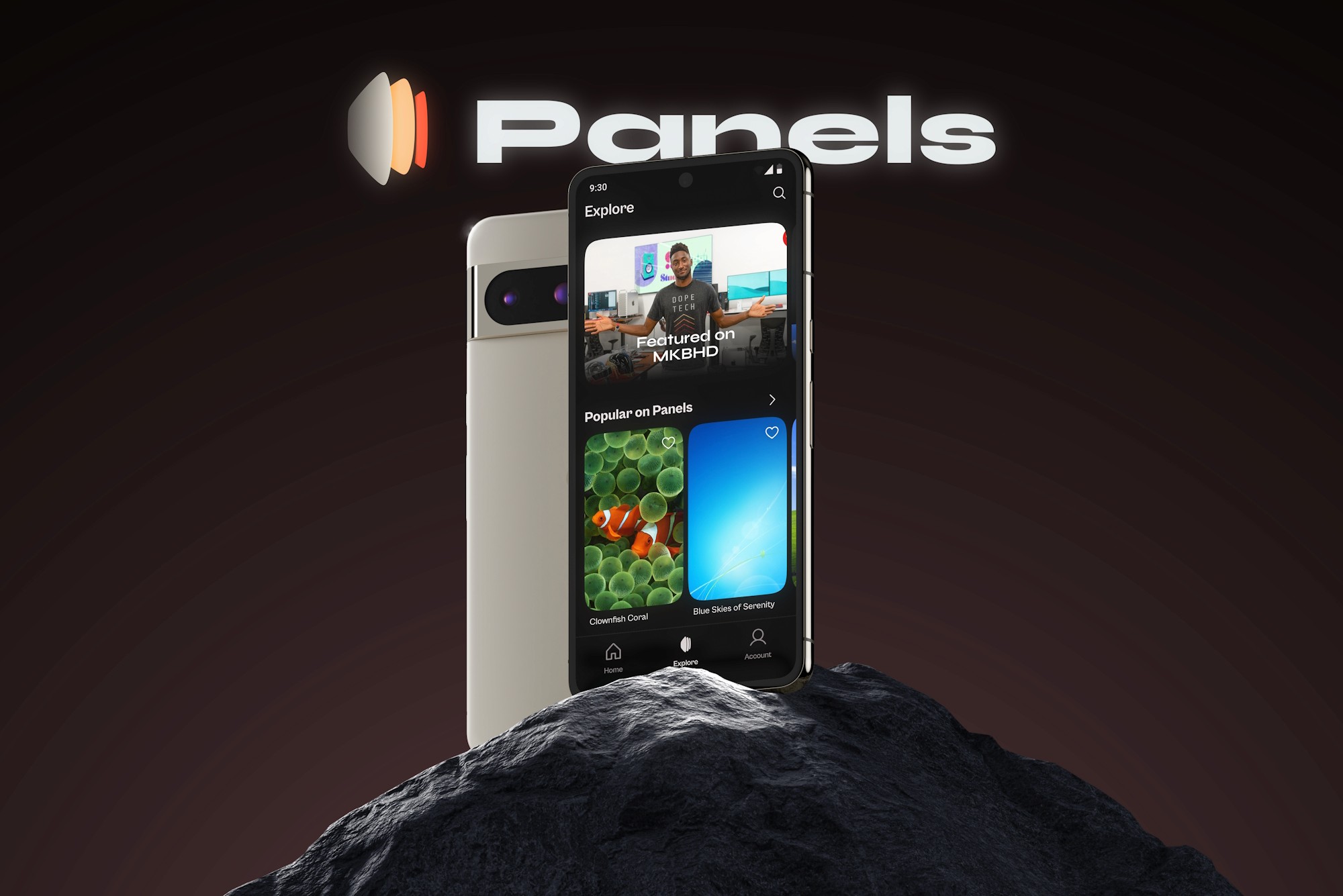
Disclaimer: This case study is a personal project and is not affiliated with MKBHD, the Panels app, or its development team. All redesign ideas and insights are my own, created purely for the purpose of showcasing my design approach. This study was based on Version 1.0.3 of the app (tested in Sep-Oct 2024). The current version may differ.
What is Panels?
The Panels app is a wallpaper app created by popular tech YouTuber MKBHD that provides users access to a collection of high-quality wallpapers. It has a premium subscription priced at ₹4,900 per year or ₹1,150 per month. Panels also have a free, ad-supported tier for accessing SD (1080p which is HD) wallpapers.
Promo Video
Here’s a small concept/promo video I put together with my motion graphics skills. Imagine if Panels was marketed like this, highlighting what really sets it apart. Take a look, and see the redesigned screens in action!
I also made a Behance presentation of the redesigned screens, so check it out if you’re short on time!
Why did I choose Panels for redesign?
I chose to redesign Panels because it presents an interesting design challenge: how to communicate complex value in a seemingly simple product. Having followed MKBHD’s channel for almost a decade, I was intrigued when the app launched at ₹4,900/year, higher than Netflix or Amazon Prime. Many dismissed it as another influencer doing an expensive “cash grab.”But in his iPhone 16 review, he briefly mentioned that it helps artists earn from their work. This small detail caught my attention because it’s not shown anywhere in the app itself. This gap between what Panels actually does and how people see it makes it perfect for a redesign project.
Let’s Get Started!
User Research👥
Before diving into the redesign, I wanted to thoroughly understand the Panels app, the problems users were facing, and how their perceptions aligned with the app’s core purpose. To do this, I used several methods to explore user needs and expectations.
First, I downloaded and used the Panels app myself, taking note of the various pain points I encountered during the onboarding process, while browsing and downloading wallpapers, and when trying to navigate the app’s different sections. This hands-on experience allowed me to get a firsthand understanding of the user’s journey.
Next, I went through the app’s Google Play Store reviews, focusing on feedback marked as helpful by at least 20 people. This secondary research allowed me to identify common issues and frustrations that users were experiencing, which aligned closely with the problems I had encountered during my own app usage.
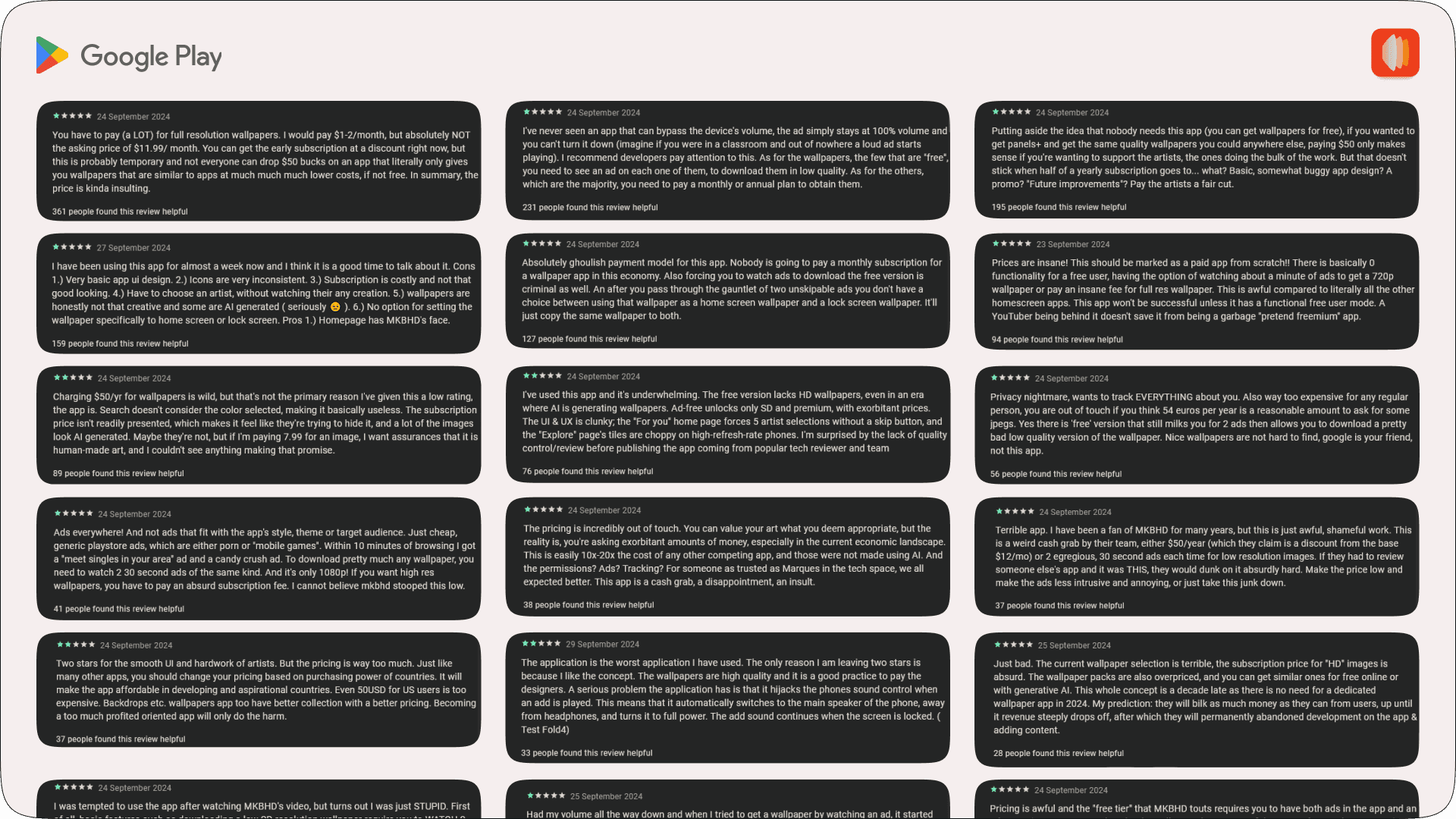
After that, I recruited 6 participants to take part in user testing. I asked them to complete a series of tasks, such as downloading a wallpaper, following/unfollowing an artist, opening a purchased collection, and searching for specific content. These tasks were based on the insights from Play Store reviews. I screen-recorded these interactions and collected data on task completion rates, time on task, and Single Ease Questions (SEQ).Once the tasks were done, I also had participants complete a System Usability Scale (SUS) survey to get their overall impressions of the app.During my research, I focused on areas where user behaviour or feedback didn’t align with the app’s intended purpose. This helped me identify key pain points that kept users from fully engaging with the app.
Pain Points
Through user research and testing, I identified seven key pain points affecting the Panels app experience:Value Proposition: Users struggled to understand why they should pay ₹4,900/year for wallpapers, as the app failed to communicate how their subscription supports artists.Complex Onboarding: The mandatory “follow 5 artists” onboarding step confused users, as they had to choose based on limited information with no option to skip.Navigation Issues: Users had difficulty finding purchased collections and distinguishing between the Home and Explore pages, which looked nearly identical.Limited Functionality: Basic features like previewing, saving wallpapers to the gallery or setting them specifically for home/lock screens were missing.Outdated Design: The app’s UI felt dated with poor typography choices and confusing interface elements.Ad Experience: The free tier was overwhelmed with ads, appearing while scrolling, downloading, and general browsing.Unclear Resolution Options: Users were confused by the SD/Full res terminology, especially since SD actually meant 1080p HD quality.
Wireframes and Iterations
I started sketching various options to improve the existing design which can address the identified pain points. After finalizing the user flow and IA, I moved on to the UI design phase and refined the design after multiple iterations.
Now, onto the redesign. Let’s start with onboarding, where users begin their journey.
Onboarding Experience
Onboarding is critical for welcoming users, demonstrating app value, & driving engagement. A seamless onboarding flow is key to setting expectations and reducing early dropoff.
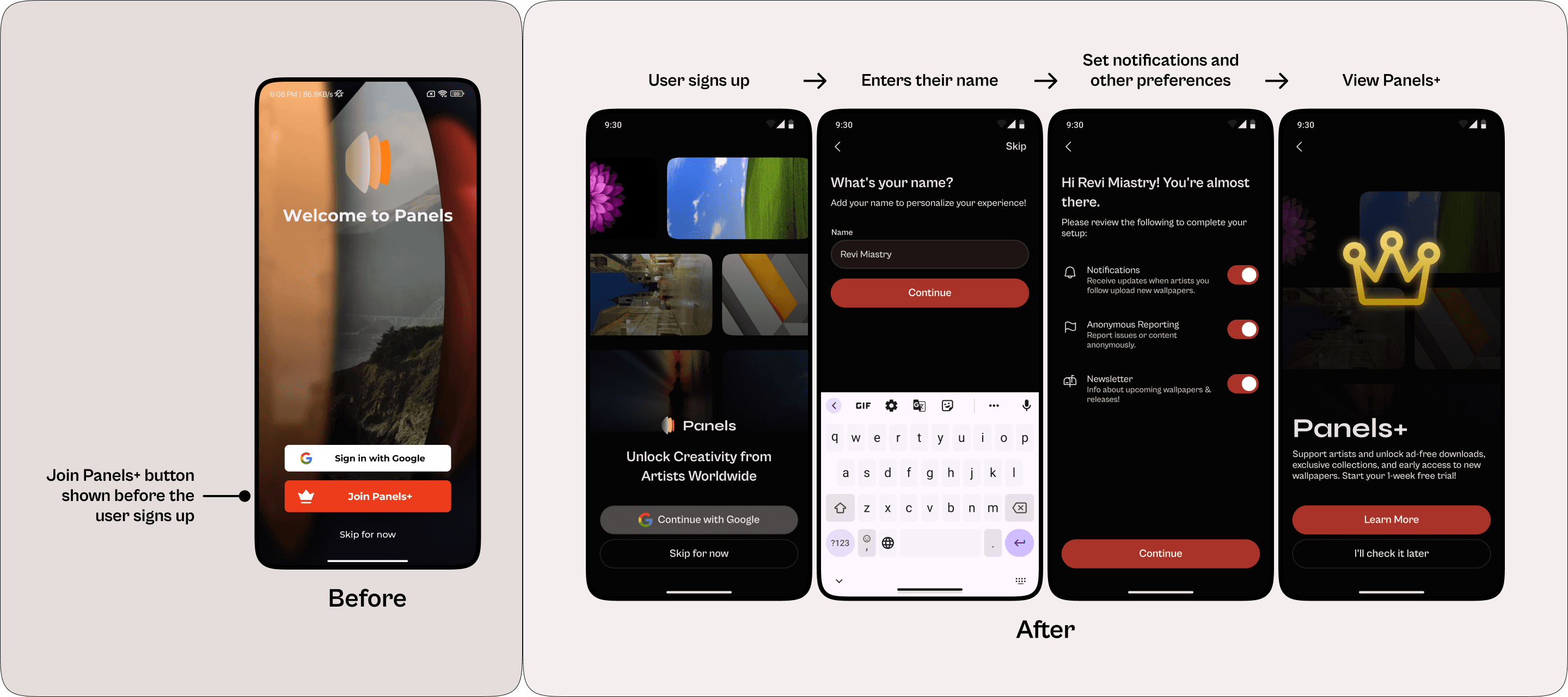
Problem 1: Panels+ Option Introduced Too Early
The app displayed a ‘Join Panels+’ button alongside sign-in, confusing users who couldn’t subscribe until after account creation. This missed the opportunity to properly introduce premium features.
Solution:
I restructured onboarding to first guide users through account setup, customize their preferences, and then introduce the Panels+ subscription page. This new flow ensures users complete essential steps, then introduces the premium option and free trial at just the right moment.
Problem 2: Forced Artist Selection Without Context
Onboarding forced users to follow 5 artists, only showing 2 wallpaper samples and a profile picture, with no artist names or ability to skip. This frustrated users seeking specific creators, as they couldn’t identify artists. The mandatory selections also limited personalization, populating the feed with content from just those 5 randomly chosen artists.
Solution:
In the redesign, users will be asked to follow styles rather than artists. Instead of 5 artists, the new flow lets them select 3 preferred styles (abstract, 3D, nature, etc). The app then populates the feed with matching wallpapers, reducing confusion and allowing users to discover artists within their preferred styles.
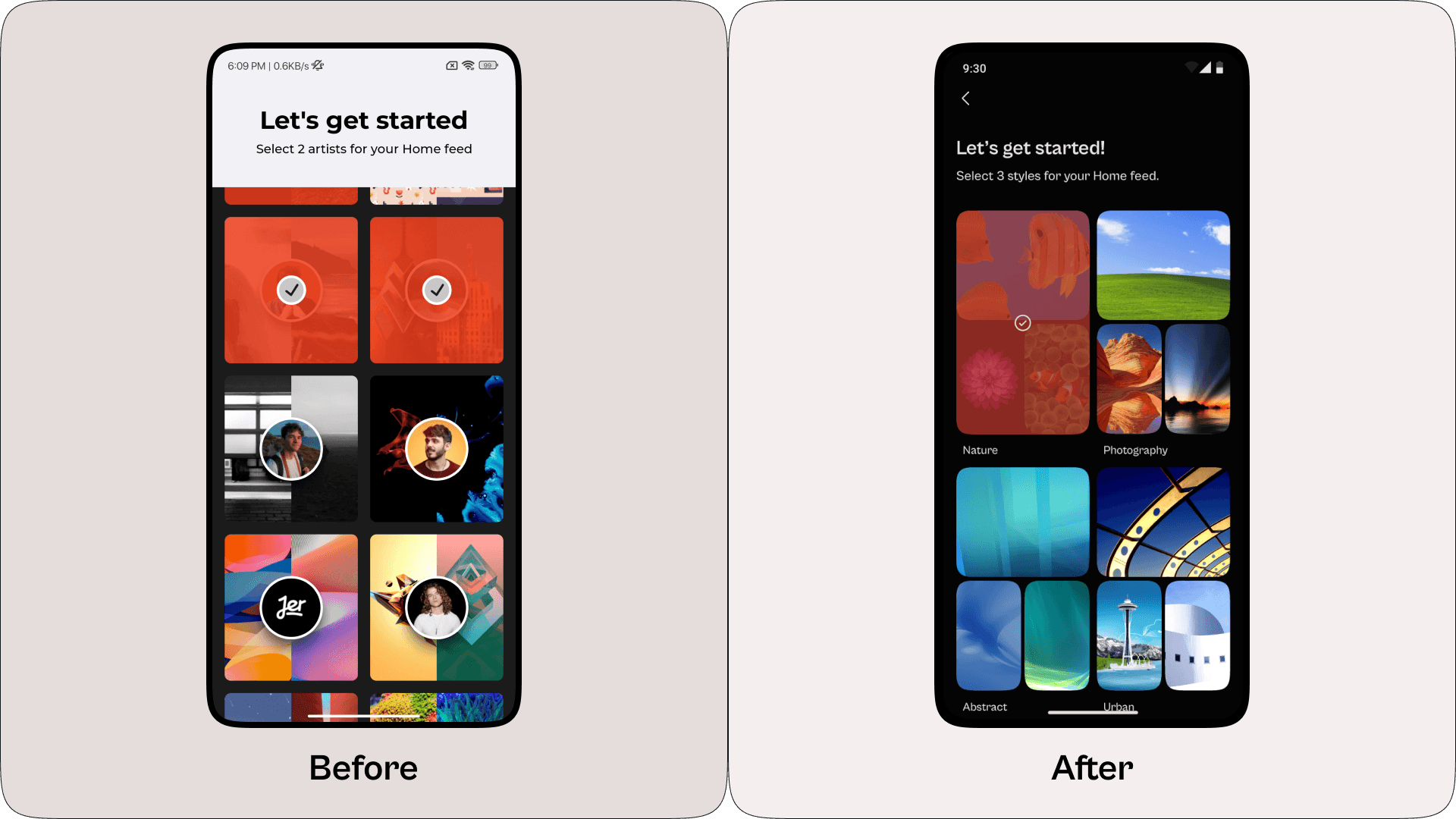
The new onboarding achieved an SEQ average of 6.33, showing people were happy with the simplified approach.
Home/For You Page
The Home/For You page serves as a personalized content hub where users can discover wallpapers based on what they’re following.
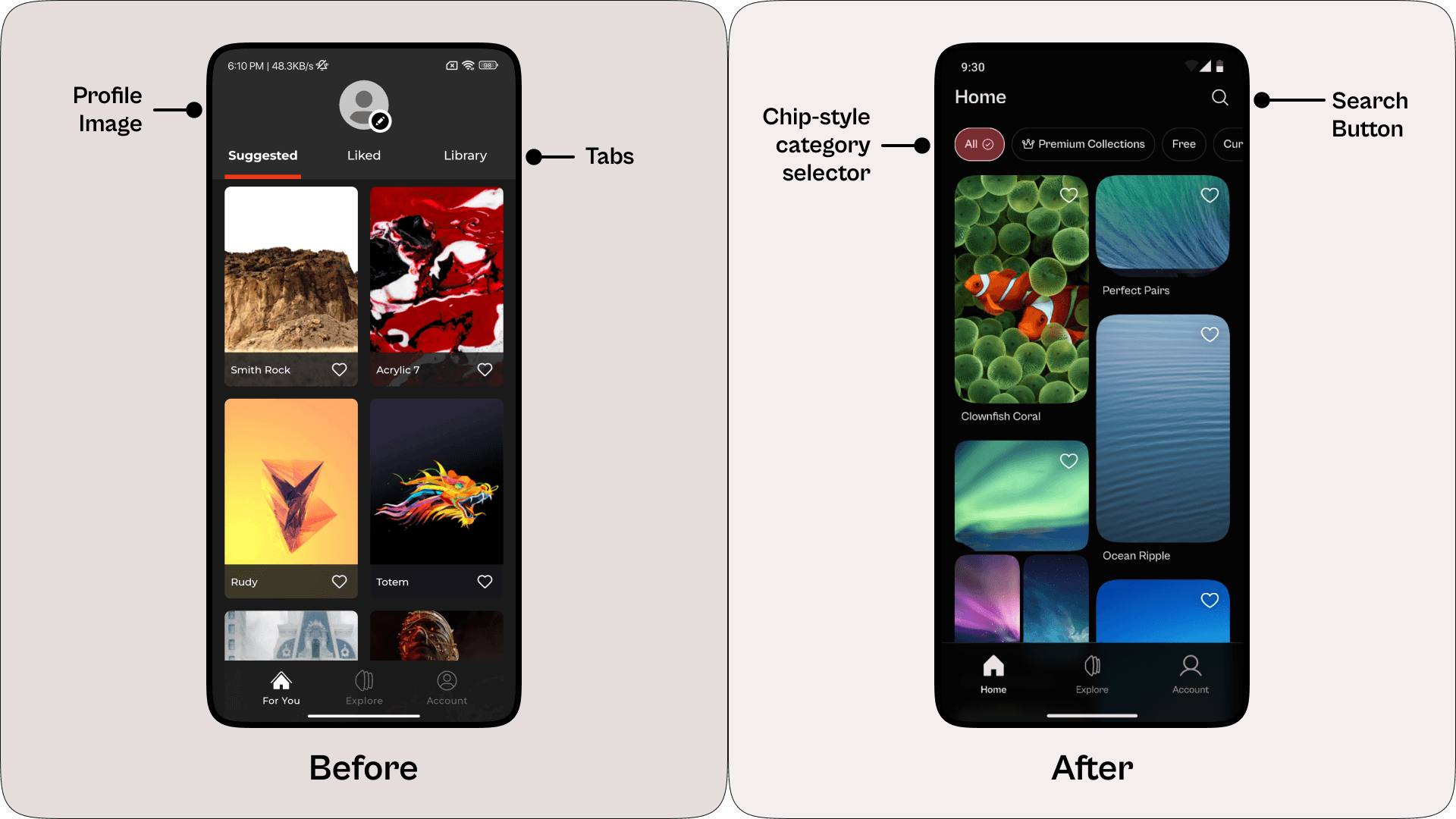
Problem: Cluttered Layout and Misplaced Features
The ‘For You’ page had tabs like ‘Suggested’, ‘Liked’, and ‘Library’. Then, there is a big profile picture above the tabs. This made the layout confusing, especially with the ‘Library’ tab showing paid collections, which felt out of place. The default starting page wasn’t ‘For You’, which has the Home icon and users expect it to be the main starting point.
Solution:
In the redesign, the page was renamed ‘Home’ to match the home icon. The ‘Liked’ and ‘Library’ sections were moved to the Account page, where they fit better. Category selector chips lets users toggle between options like All, Premium Collections, Free, and Curations. A Search button is added in the top bar. This streamlined layout focuses on content based on the styles and artists the user follows for a better browsing experience.
Explore Page
The purpose of the Explore page is to help users browse and discover wallpapers in a structured, engaging format, highlighting popular collections and styles while reducing visual overload and enhancing discoverability.
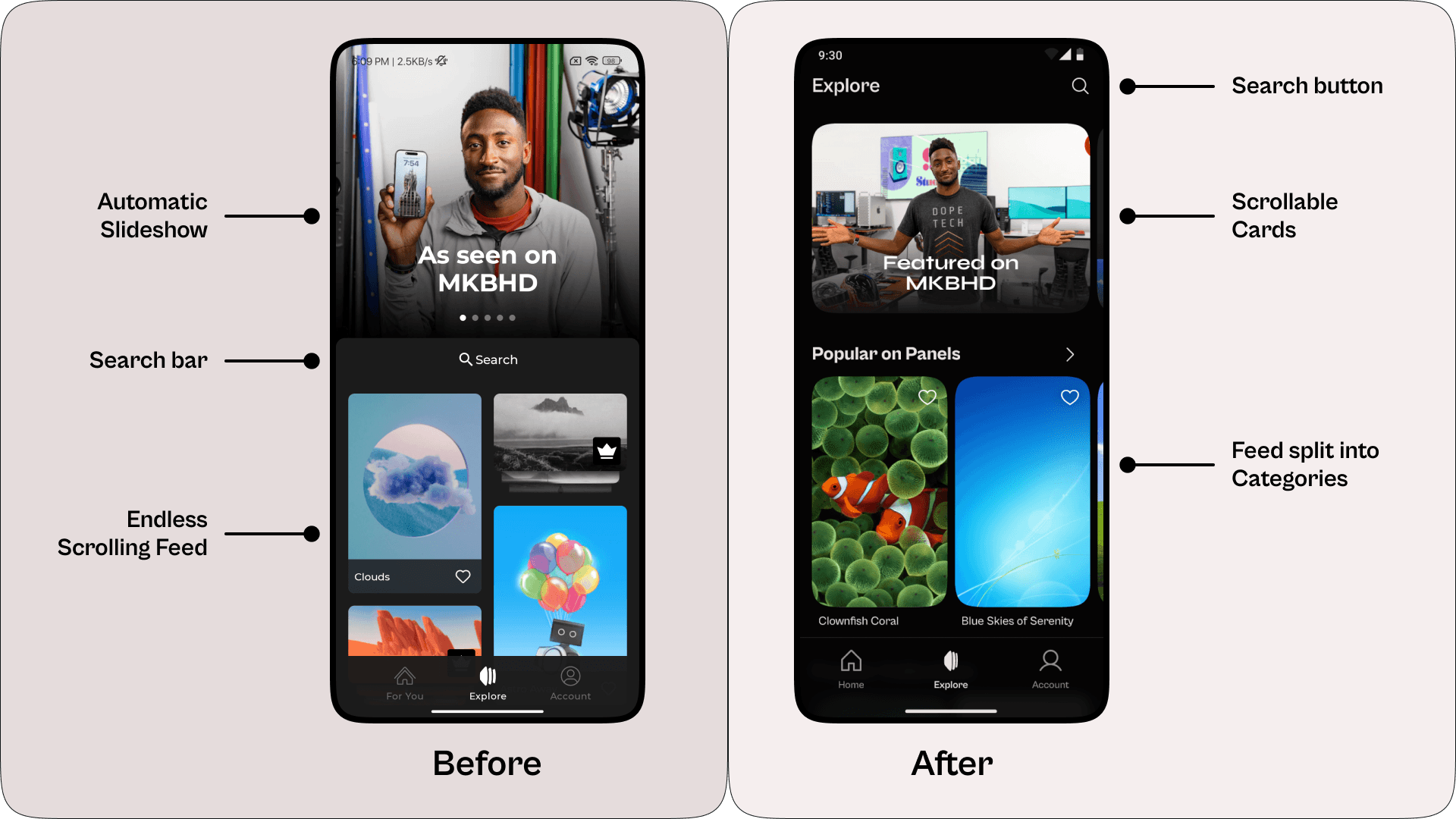
Problem 1: Automatic Slideshow Causing Banner Blindness
The Explore page had an automatic slideshow at the top, but these can suffer from banner blindness, making them conversion killers. Users often overlooked the rotating content, reducing visibility for promoted collections and updates.
Solution:
I replaced the automatic slideshow with scrollable cards. Unlike automatic slideshows, scrollable cards allow users to engage at their own pace. By giving users more control, they’re more likely to view and interact with them, reducing banner blindness and boosting conversion rates for featured collections and promotions.
Problem 2: Endless Scroll Lacking Content Organization and Context
The Explore page had an endless feed that mixed wallpapers, paid collections, and ads. This cluttered layout made it hard for users to find popular or unique content. They’d just keep scrolling without understanding the different sections, like trending wallpapers or collections, since everything was jumbled together.
Solution:
Instead of an endless scroll, the Explore page now has labelled sections to guide users:
Popular on Panels: A section showcasing popular wallpapers.
Popular Collections: Showcases collections that are popular among users.
Staff Picks: A handpicked selection of wallpapers chosen by the app’s team.
Explore by Styles: Allows users to browse wallpapers by specific styles, making it easy to find a particular aesthetic.
Explore New Artists: Features emerging artists on the platform, helping users discover fresh talent.
Explore Curations: A section showcasing user-created curations (More details on this feature will be covered later).
Dividing the feed into categories without ads gives users a better experience, making it easier to explore content based on their interests. This reduces clutter, enhances the visibility of paid collections, and boosts engagement with featured content.
Problem 3: Ineffective Search Bar Placement and Limited Filtering
The search bar was placed between the slideshow and feed, making it look like a heading or divider. During testing, users often missed it due to this placement, and the clickable area was limited to the text, not the full box. With only basic colour filters and six categories, the search felt restrictive for users trying to find specific content.
Solution:
In the redesign, I moved the search to the top navigation bar and gave it a dedicated page. This page includes recent searches and trending search suggestions. New filters let users sort by ‘Most Downloaded’ or ‘Newest’ and offer a wider range of colours, styles, and content types (like Collections, Wallpapers, and Artists). These changes make finding the right wallpaper or artist easier.
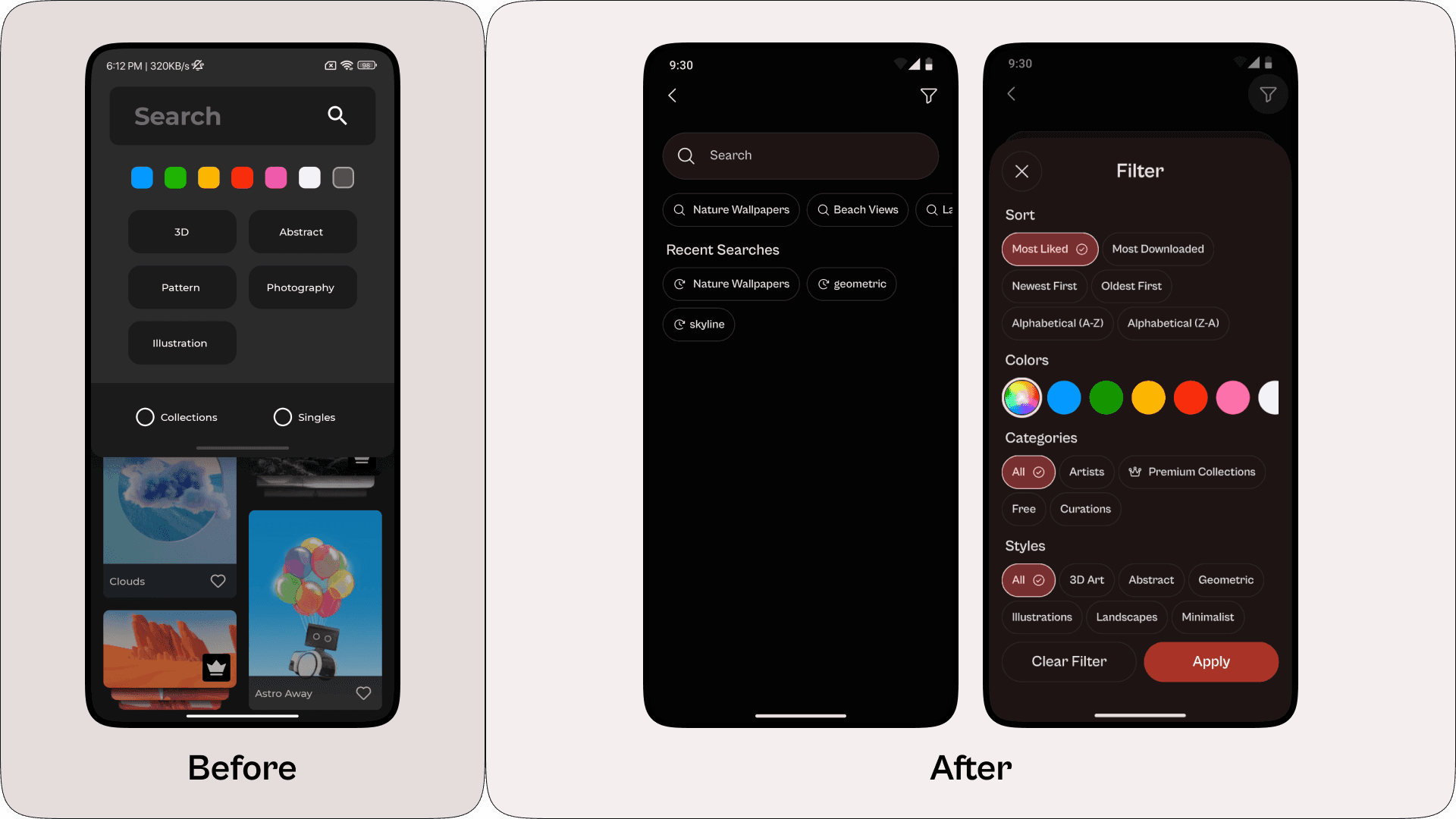
User testing showed significant improvements in search usability. The SEQ score for search tasks increased by 26.67%, and task completion time was reduced by 41.42%.
Wallpaper Page
The Wallpaper Page serves as the core content viewing and interaction area within the app. Here, users explore detailed previews of wallpapers, along with essential information like artist details and collection features, ultimately leading them to download or purchase.
Problem 1: Confusing Resolution Options & Limited Wallpaper Application Choices
Tapping “Get Wallpaper” opens a menu with two choices: “Unlock Full Resolution” or “Watch 2 ads for SD”. After watching the ads, the button changes to “Small 1080p” which is odd since it was called SD earlier when 1080p is actually HD. This naming confusion stands out since HD is part of MKBHD’s brand. Once downloaded, the button changes to “Set Wallpaper” and tapping it sets the image to both home and lock screens without any choice given to the user.
Solution:
The new design shows two options on the wallpaper page: “Download Ad-Free” and “Download (Watch Ad).” Both give full-quality wallpapers, removing confusion on quality. After downloading, a menu appears with choices to “Save to Gallery,” “Set as Homescreen,” “Set as Lockscreen,” or “Set Both,” letting users pick exactly where they want the wallpaper.
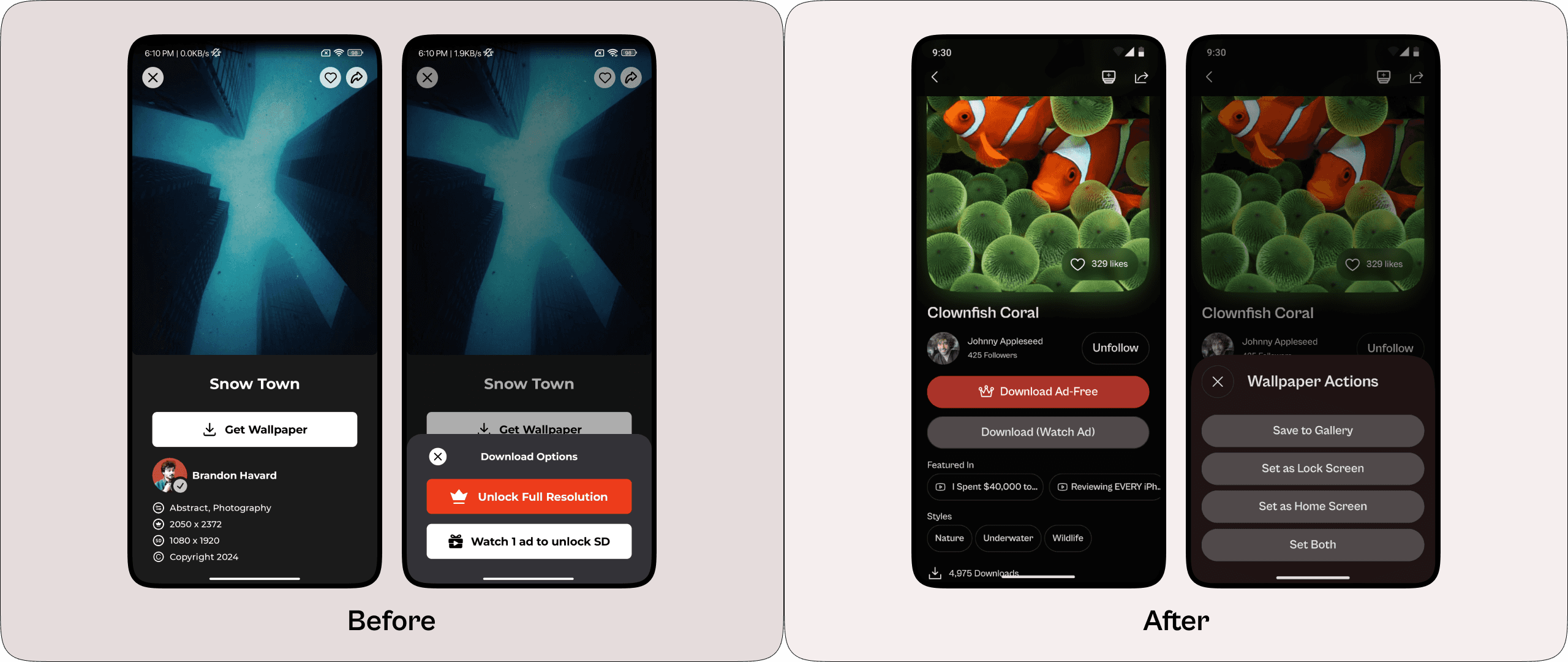
User testing showed strong improvements after these changes, with the SEQ score for downloading wallpapers up by 28.57% and task completion time reduced by 52.16%.
Problem 2: Lack of Wallpaper Preview Options
Tapping the wallpaper or “Get Wallpaper” button brings up the same bottom sheet, but it doesn’t show a preview. This makes it difficult for users to decide if they want the wallpaper.
Solution:
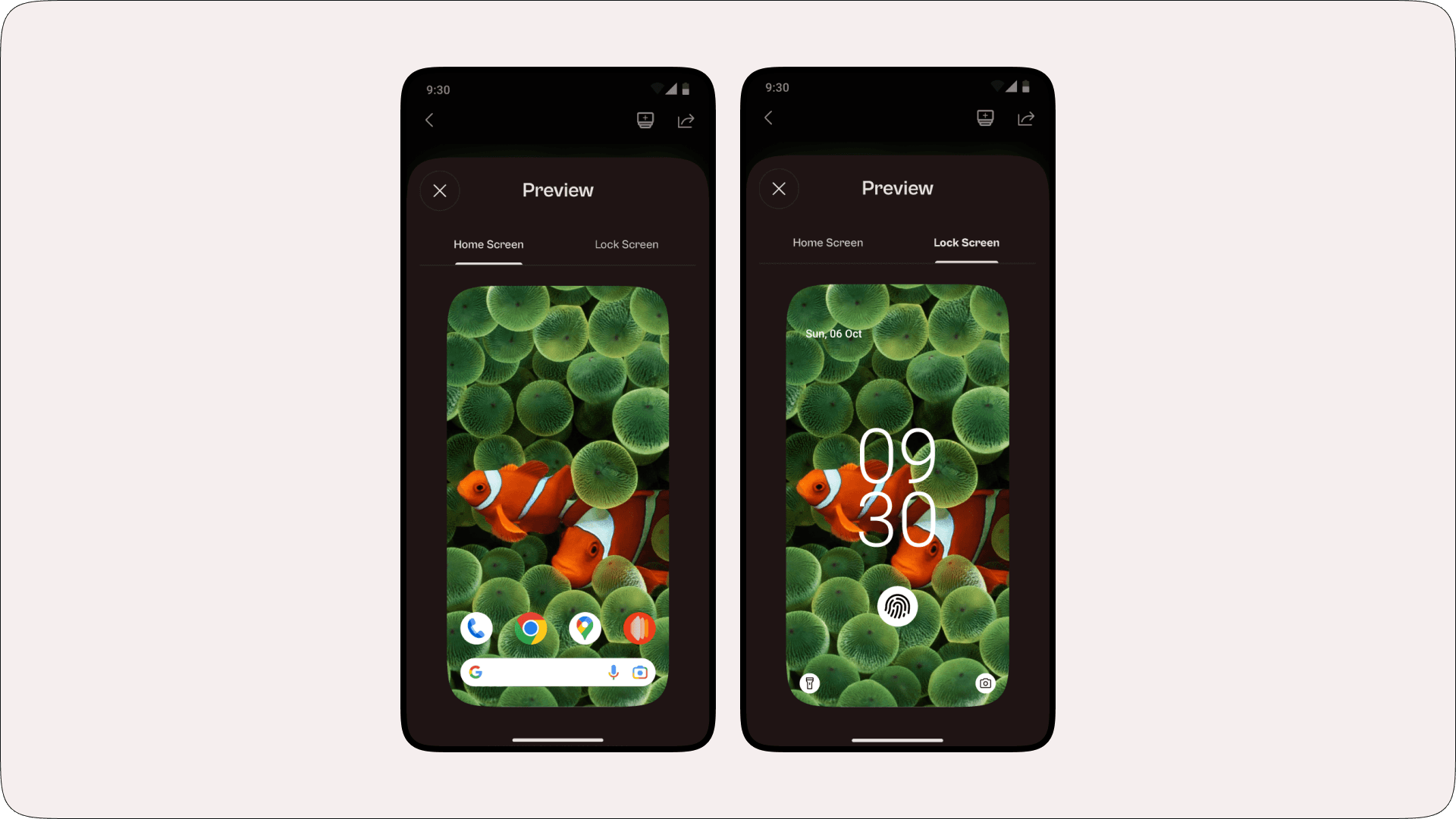
Now, Tapping a wallpaper opens a bottom sheet showing how it looks on home and lock screens with simulated icons. This helps users see how the wallpaper will fit their screen before they choose to download it.
Problem 3: Limited Engagement Indicators and Misinterpreted Follow Button
The wallpaper page lacked metrics like likes, downloads, and artist’s followers, making it hard for users to know what’s popular. This is a missed opportunity to add social proof and boost user engagement. The follow button was too small and in a confusing spot. Users thought the “+” meant the artist is a Panels+ member, and the checkmark meant the artist was verified. The button was smaller than the required 48x48 size.
Solution:
The new design now shows how many likes & downloads each wallpaper has, providing users with social proof. The follow button is now bigger and clearer, saying “Follow” or “Unfollow” instead of using confusing icons. This makes it easier for users to follow/unfollow artists they like.
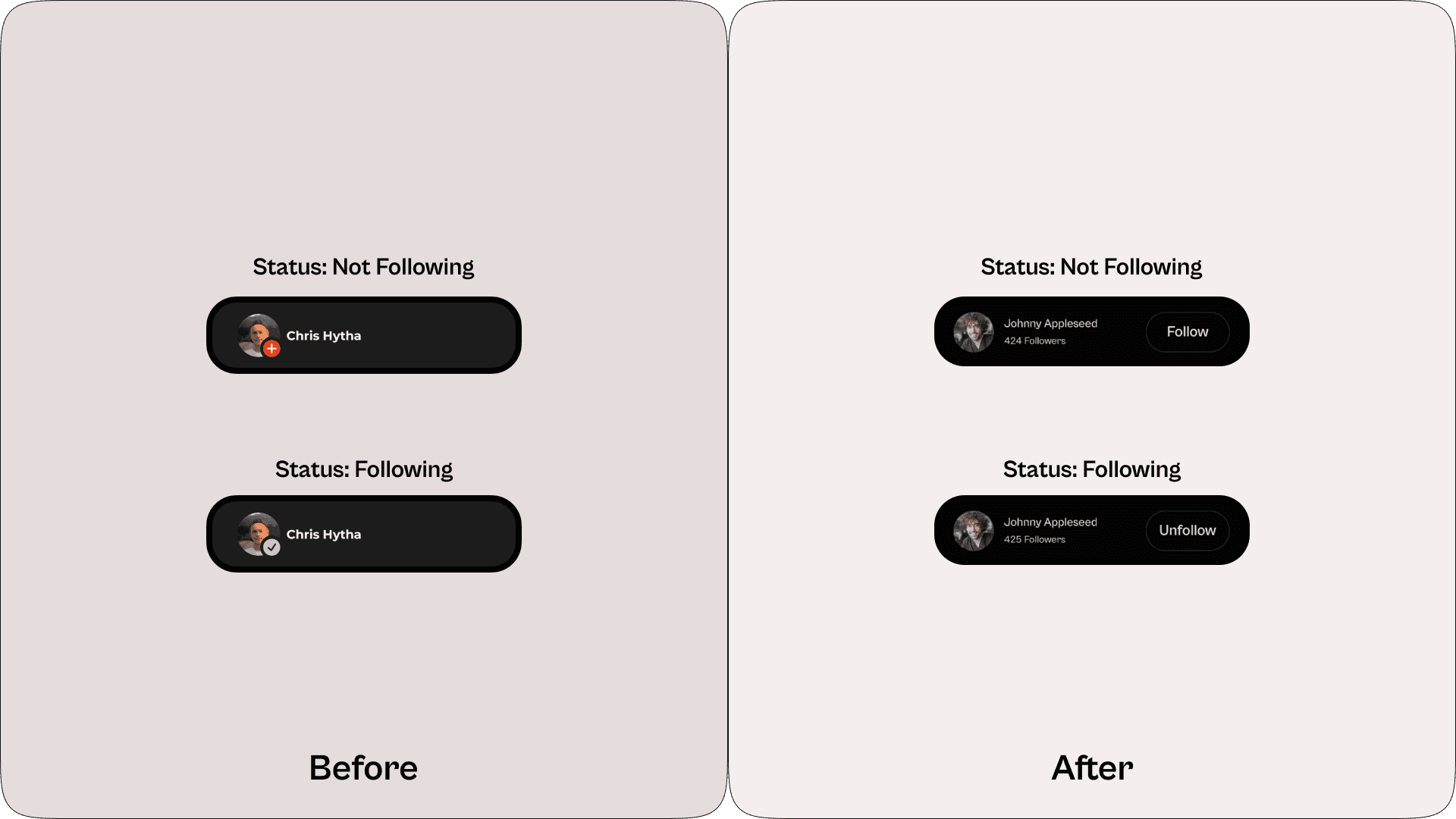
User testing showed significant improvements with these changes. The SEQ score for the follow/unfollow task rose by 227.27%, and task completion time improved by 63.79%, as users could now follow or unfollow artists effortlessly.
Problem 4: Missing Context for “As Seen on MKBHD” Wallpapers
The “As Seen on MKBHD” page showed wallpapers from MKBHD’s YouTube videos. However, users couldn’t find which video each wallpaper was from, making it hard to connect the wallpapers with MKBHD’s content.
Solution:
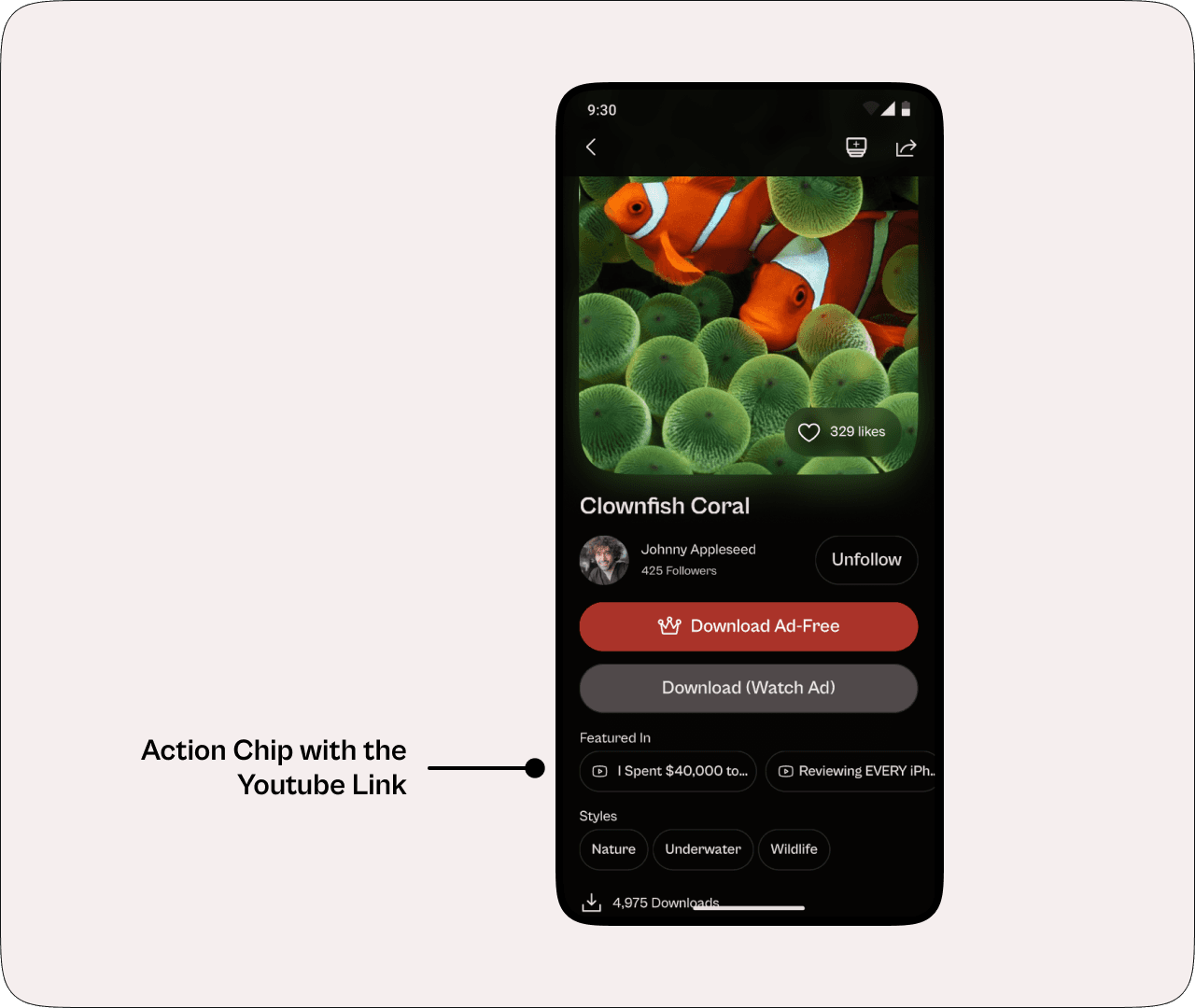
In the redesign, Action Chips displaying the video title are added to the Wallpaper page. When the user taps the video title, it takes them right to the video where MKBHD used that wallpaper. This helps users find the videos they want.
Accounts Page
The Accounts Page is designed to provide users with easy access to their profile, settings, preferences, and other personalized app functionalities, offering a cohesive overview of their activity within the app.
Problem 1: Disorganized Account Section Leading to Difficult Navigation and Access
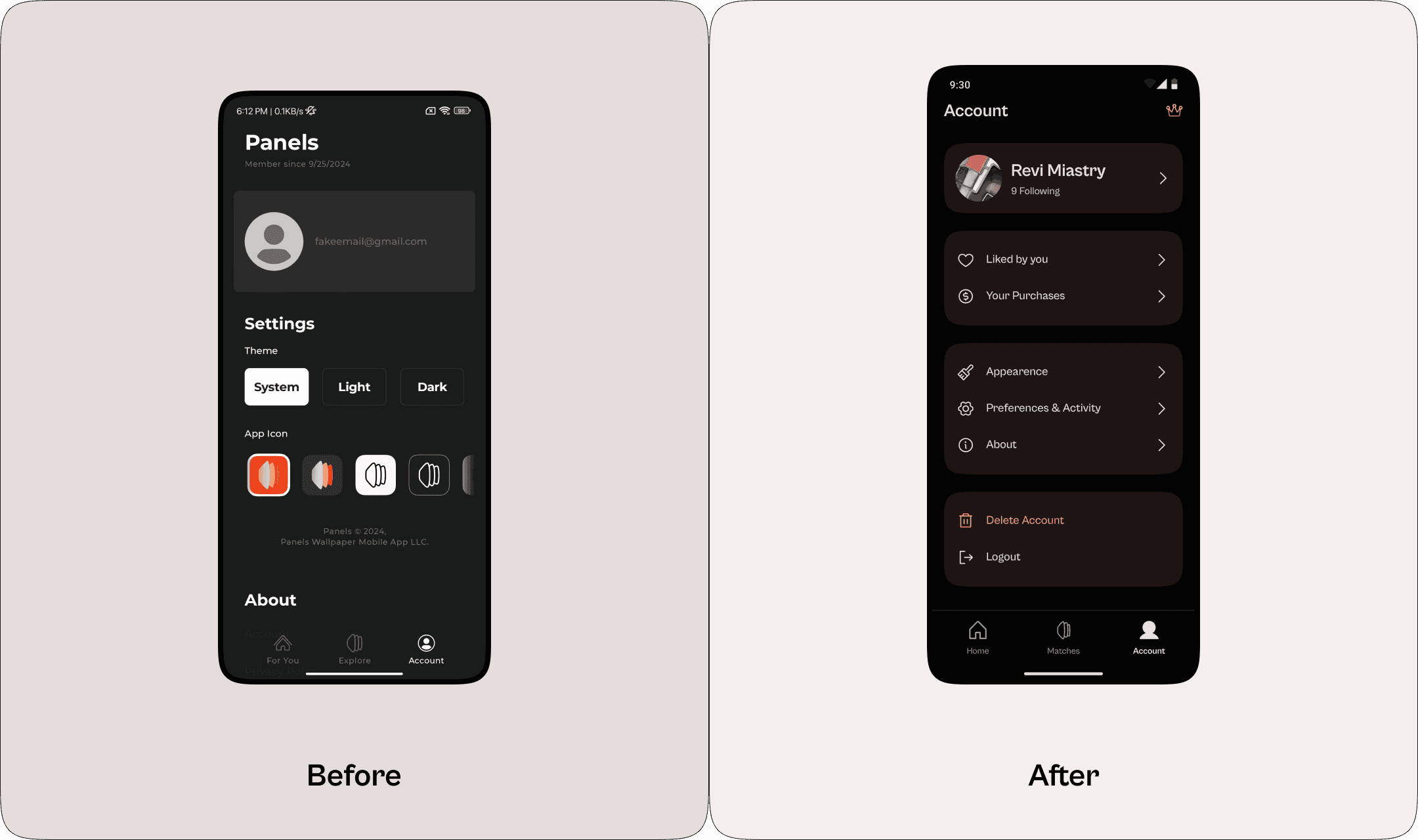
As mentioned earlier, users were confused about finding purchased collections placed in the Library tab of the Home/For You page. Testing showed that many expected their purchases and like history to be in the account section, like most other apps. Some settings were also scattered, making the experience a bit confusing.
Solution:
I reorganized the account section into a more user-friendly, settings-style layout:
Moved ‘Liked by You’ and ‘Your Purchases’ into the account section, where users expect to find them.
Grouped account settings (Profile, Preferences, Appearance) into a clear list with dividers, similar to OS settings pages, so users can find options easily.
Added a Crown icon in the top bar for quick access to Panels+.
Problem 2: Limited Profile Personalization and Account Information
Users wanted a way to view and manage who they were following, but the app didn’t have a dedicated page for this purpose, limiting social interactions.
Solution:
I added a user profile page (like on Instagram or X, formerly known as Twitter) where users can see and manage who they follow. They can also share their profile to connect with others.
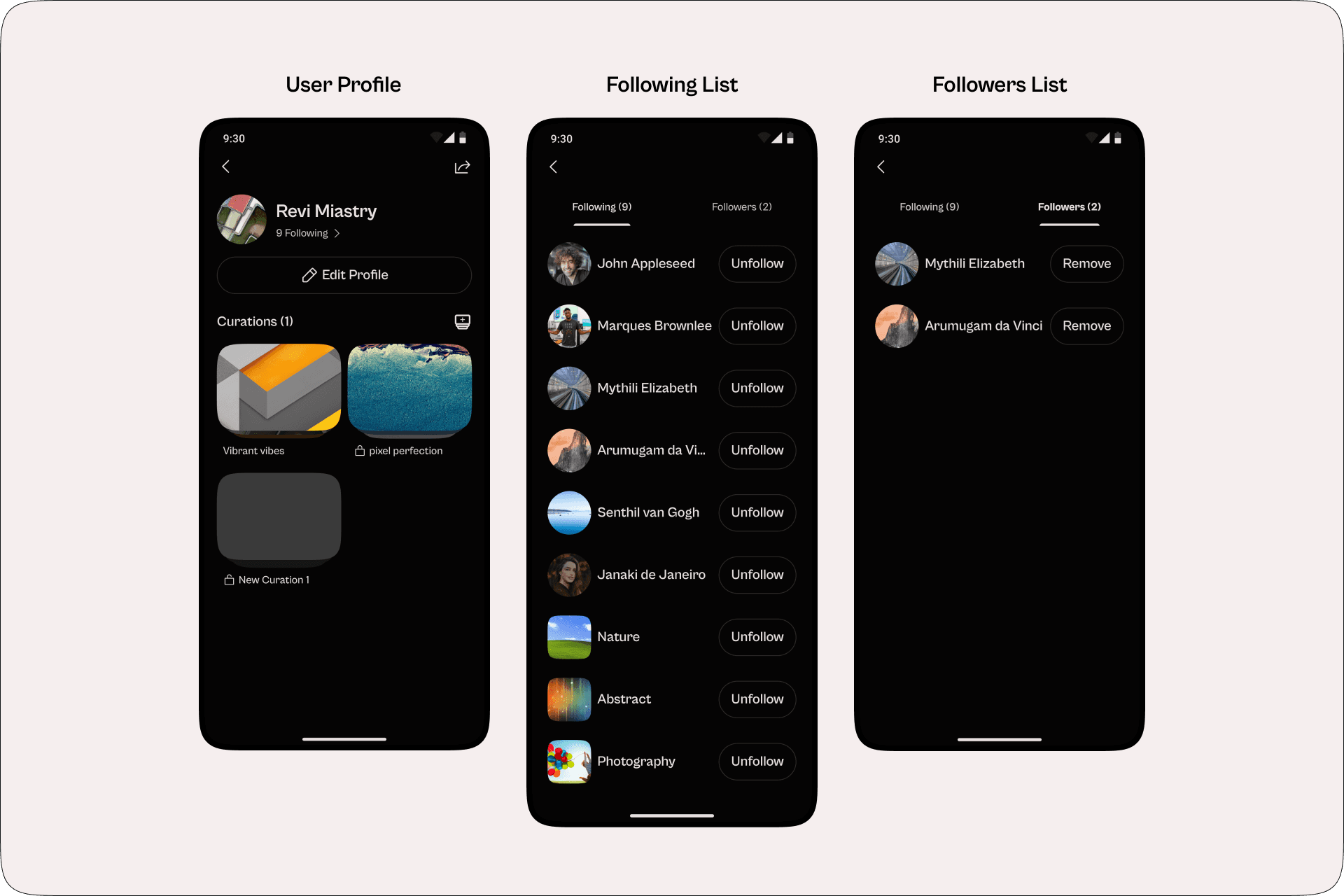
Curations
The Curations feature is a new addition inspired by the “As Seen on MKBHD” page, designed to boost user engagement and sharing outside the app. This feature allows users to create personalized playlists of wallpapers around themes like nature, abstract art, etc making it easy to organize and showcase their style.
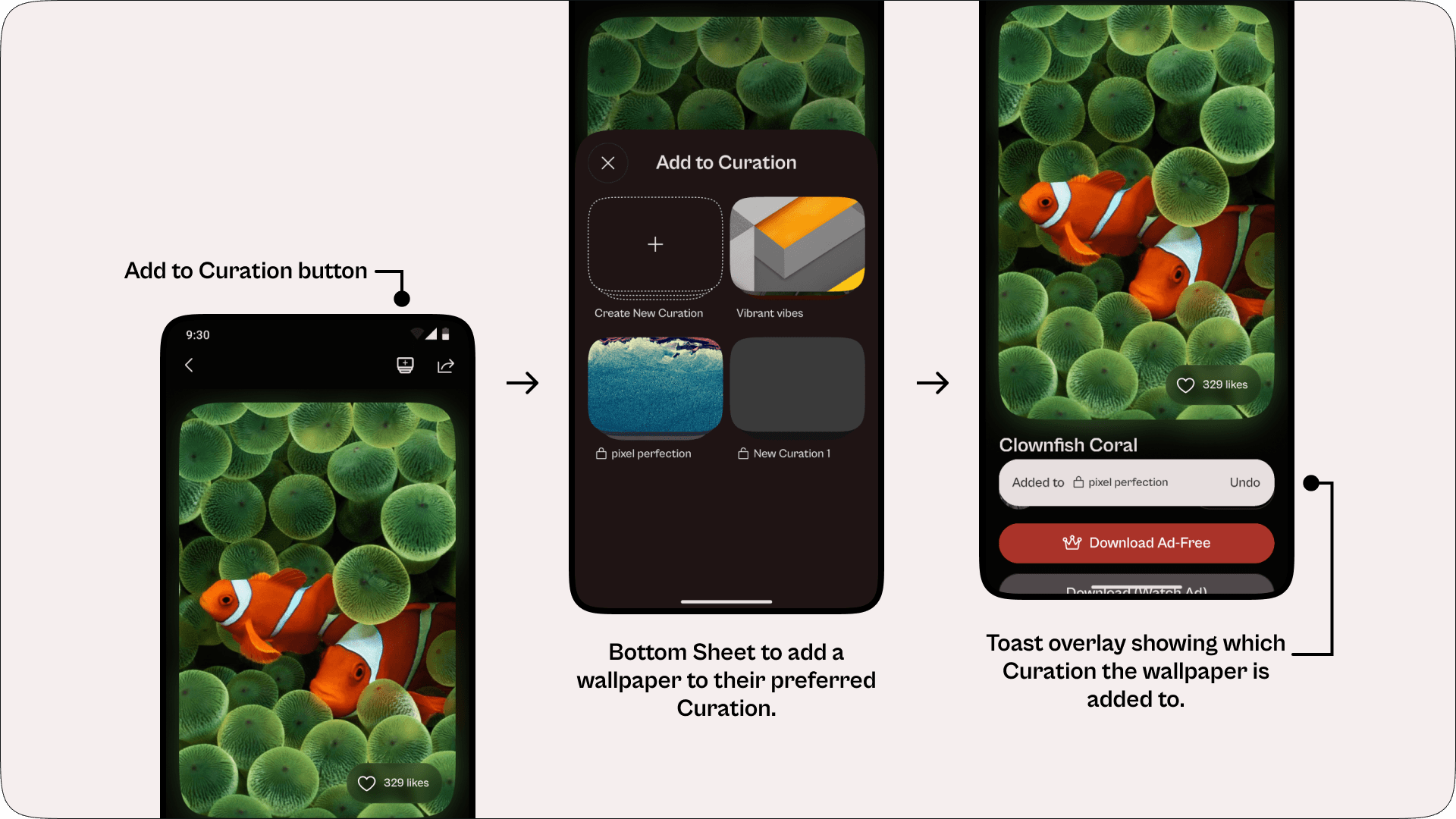
Creating and Sharing Curations
Creating a Curation is simple. Users can give it a name and choose whether it should be public or private. Then, they can add their favourite wallpapers through the “Add to Curation” button. These Curations can then be shared with anyone, even those who don’t have the app via a link. Sharing these links lets others see their curations, which might encourage them to join the app to create their own Curations and explore more wallpapers. This task of adding a wallpaper to a curation scored a SEQ rating of 5.67.
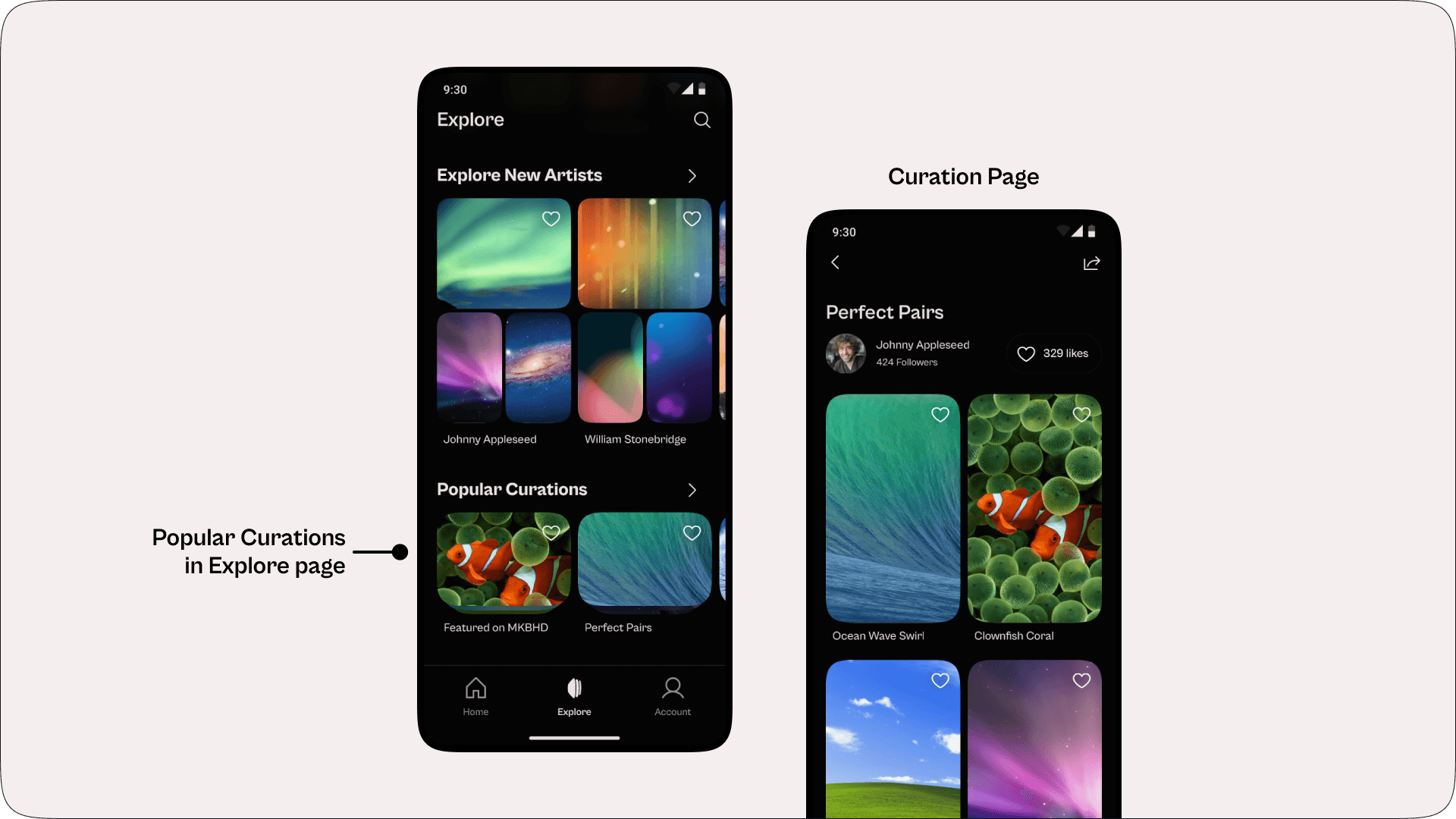
Discoverability with Popular Curations
The Explore page has a “Popular Curations” section, where the most popular curations are shown. This makes it easy to discover wallpapers through these curations that may not be in other sections.
Panels+ Page
The Panels+ page highlights the benefits of a premium subscription, like no ads, exclusive collections, and high-quality downloads, to show users why upgrading is worth it.
Problem: Unclear Value Proposition
The Panels+ page lacked transparency around its core purpose: supporting artists. It just focused on ad-free and full-res downloads. This coupled with the high prices, even after discounts, users assumed the app was simply a cash grab. Once again, “SD” is called 1080p, which was odd since MKBHD’s brand uses “HD”, repeating the confusing labelling from earlier.
Solution:
The redesigned Panels+ page clearly highlights its core mission of artist support, shifting focus from simply “paying for ad-free content”. The price is reduced from ₹1,150 per month to ₹149 per month. There’s also a free trial so people can try the benefits before subscribing.
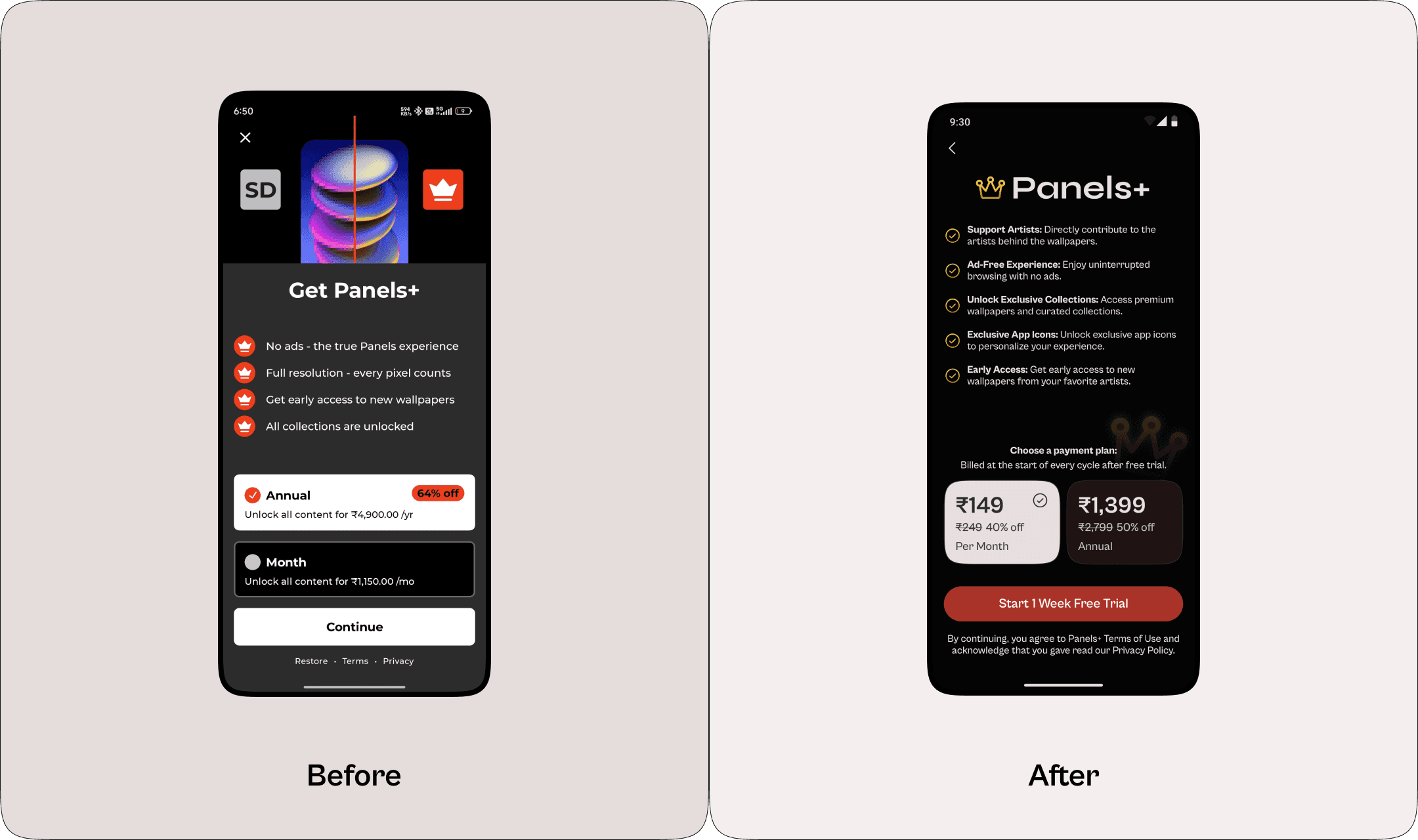
After these changes, user testing revealed a notable shift in perceptions of the Panels+ subscription. 4 out of 6 users wanted to pay for Panels+, compared to zero interest before. The reasonable prices and clear messaging about supporting artists helped change users’ view from seeing it as a money grab to a way to help creators.
Collections Page
The Collections page offers users a set of wallpapers created by individual artists, allowing for themed exploration and one-time purchases.
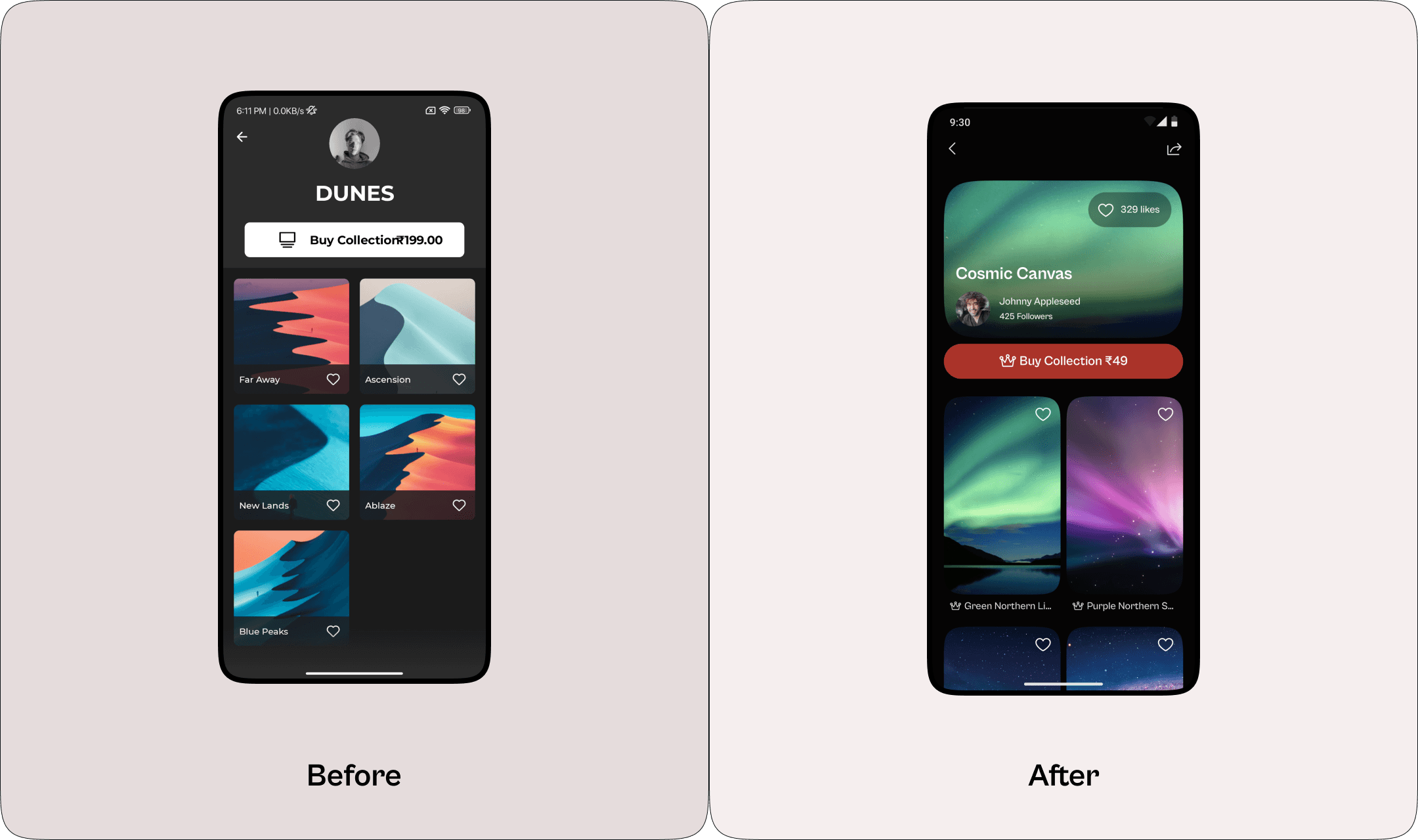
Problem: High Collection Prices
Each Collection was offered at a price of ₹199, which users found steep, resulting in minimal purchase intent.
Solution:
The new design lowered collection prices to ₹49 and introduced a visual refresh. These changes make collections more affordable and boost purchase intent.
The impact of the entire redesign was reflected in usability testing, where the System Usability Scale (SUS) score saw a remarkable 98.70% improvement, indicating that users found the redesigned app substantially more intuitive and user-friendly.
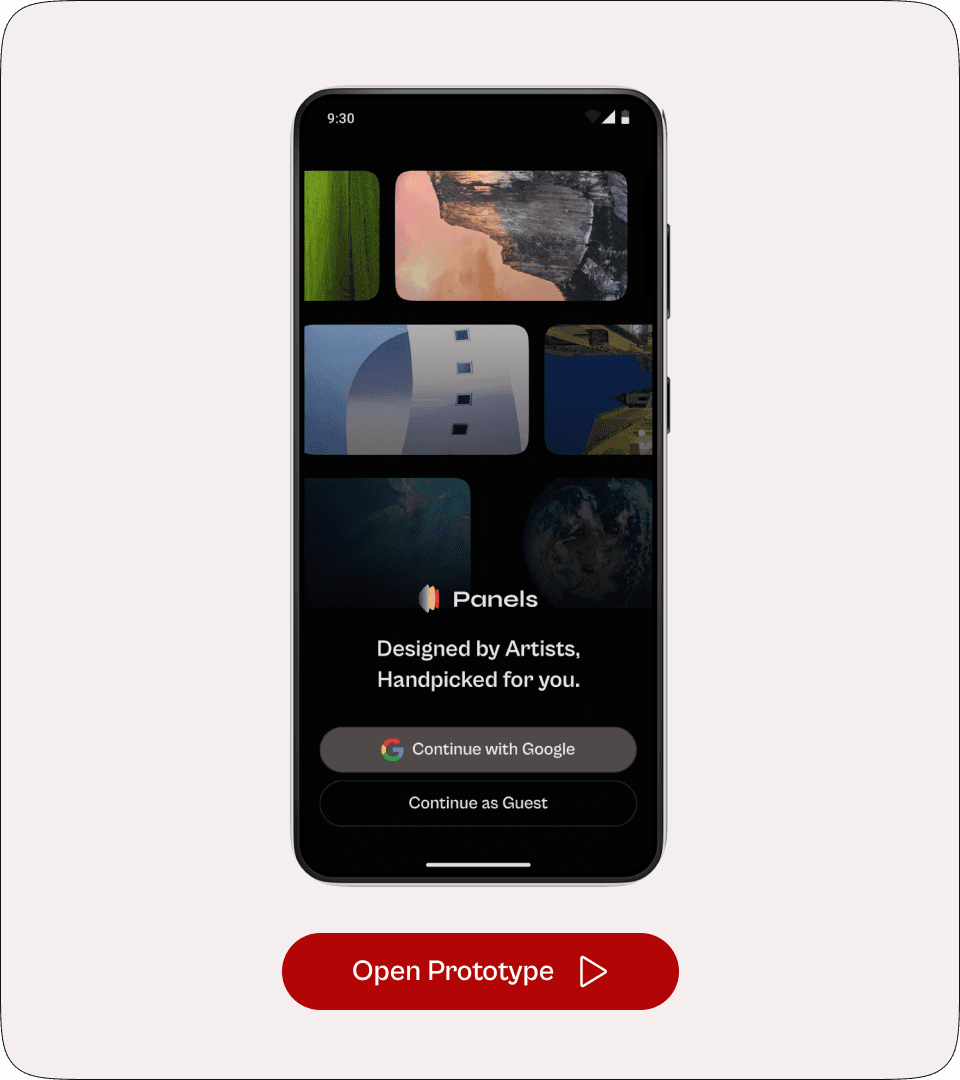
Prototype
Take a look at the prototype to see the redesign in action, and feel free to explore the full Figma file as well!

That’s all Folks! Hope you enjoyed this detailed case study of the Panels app redesign.
Final Thoughts
Redesigning Panels taught me valuable lessons about bridging the gap between an app’s actual value and user perception. Every design choice was made with user pain points in mind, focusing on supporting artists and making the app more engaging. I believe this project not only improved the app but also shaped my approach to solving seemingly simple but complex design challenges.
Learnings:
Clear, simple messages help users trust and understand the app better, this was especially important since there was a disconnect in how users viewed the app.
Taking risks with new features can pay off — I wasn’t sure if users would want Curations in a wallpaper app, but testing showed they actually liked it, though there’s still room to make this feature better.
Even minor changes in design can make a huge impact on the whole user experience.
Understood how adding social proof elements like likes and download counts directly boosts user engagement, proving the value of small but strategic UI additions.
I gained a solid understanding of Google’s Material You guidelines.
Using Figma variables extensively helped streamline creating light/dark modes, dynamically updating numbers, and designing an adaptable preview page that changes based on the selected wallpaper.
Challenges:
Following Material You rules while making sure everything was easy to read in both light and dark modes was tricky.
Even though Material You provided a solid foundation, adapting and creating new components within its guidelines while keeping everything consistent was challenging.
I had to carefully measure how well the new features worked since I couldn’t compare them to the original app.
Testing was conducted with only six participants, which gave me helpful insights but might not cover all user needs. Further testing could help validate findings and uncover additional pain points.
If you’ve made it to the end, thank you for taking the time to go through my case study! I hope this provided a clear view of my thought process and approach to redesigning the Panels app. Feel free to reach out if you have any thoughts or questions — I’d love to hear them!